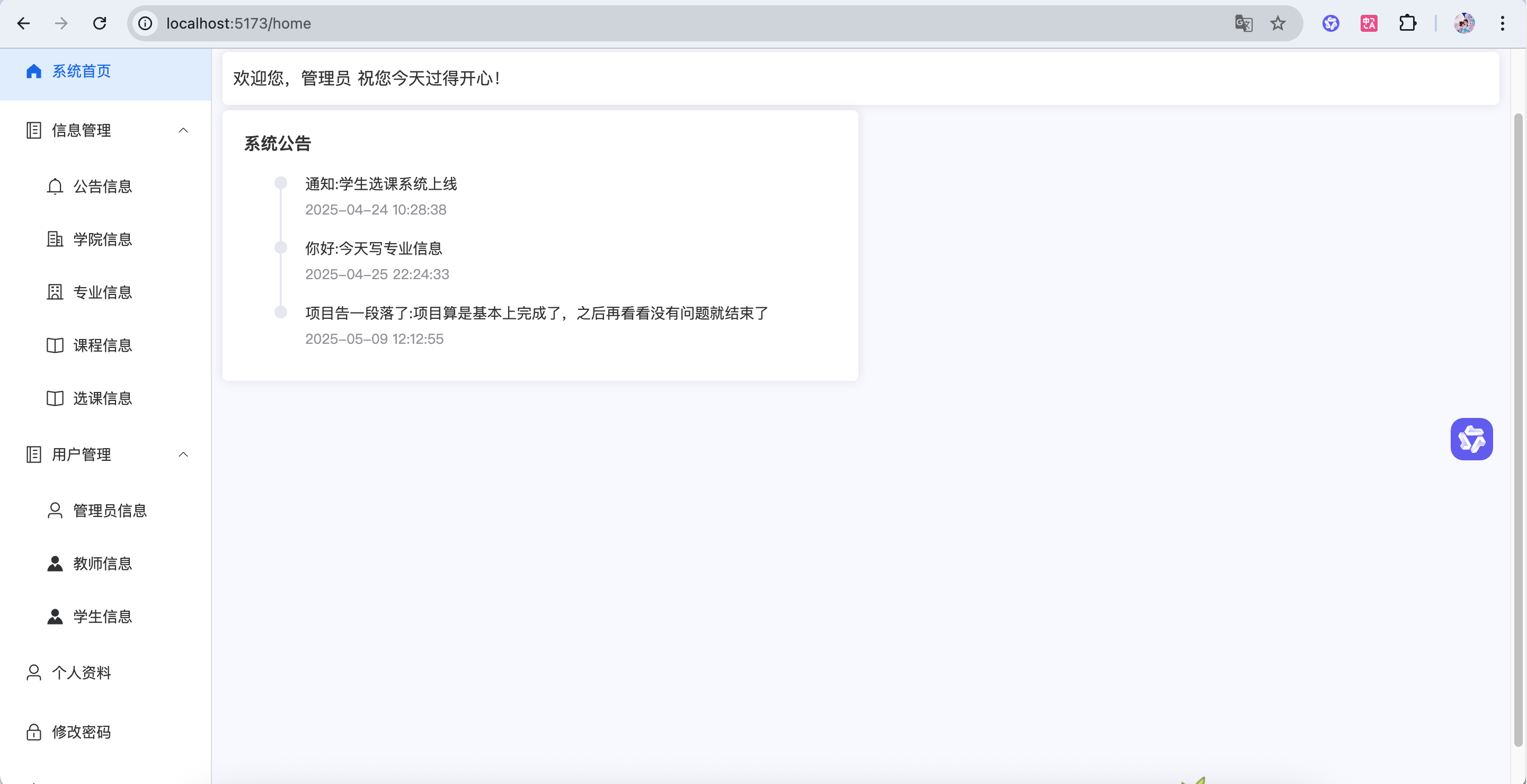
逻辑
逻辑和教师信息一样,所以可以直接复制教师信息
在数据库加上学生库,建立学生实体类就好了,前端更改一些配置,一些信息就好了,基本上都不需要改,后端内容只要把教师信息改为学生信息
要学会看报错信息
核心数据结构:
每个学员包含基本信息:ID、姓名、学号、所属学院、专业、年级等
可能还包含联系方式、学分信息等
主要功能:
增:添加新学员信息
删:删除学员信息
改:修改学员信息
查:
查看所有学员列表
按条件搜索
分页查看学员信息
前后端交互:
前端通过类似/Student/的接口与后端交互
管理页面可以查看学员列表并进行增删改查操作
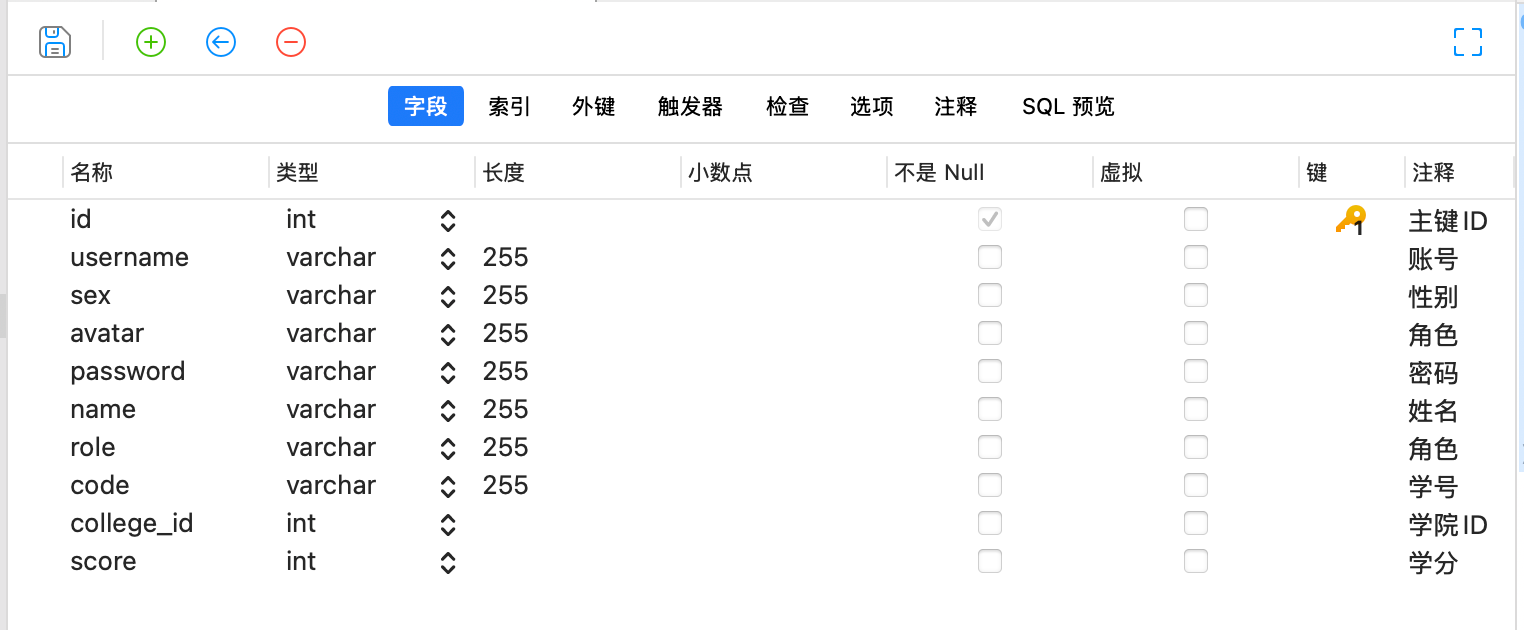
学生信息数据库
1
2
3
4
5
6
7
8
9
10
11
12
13
| CREATE TABLE `student` (
`id` int NOT NULL AUTO_INCREMENT COMMENT '主键ID',
`username` varchar(255) COLLATE utf8mb4_unicode_ci DEFAULT NULL COMMENT '账号',
`sex` varchar(255) COLLATE utf8mb4_unicode_ci DEFAULT NULL COMMENT '性别',
`avatar` varchar(255) COLLATE utf8mb4_unicode_ci DEFAULT NULL COMMENT '角色',
`password` varchar(255) COLLATE utf8mb4_unicode_ci DEFAULT NULL COMMENT '密码',
`name` varchar(255) COLLATE utf8mb4_unicode_ci DEFAULT NULL COMMENT '姓名',
`role` varchar(255) COLLATE utf8mb4_unicode_ci DEFAULT NULL COMMENT '角色',
`code` varchar(255) COLLATE utf8mb4_unicode_ci DEFAULT NULL COMMENT '学号',
`college_id` int DEFAULT NULL COMMENT '学院ID',
`score` int DEFAULT NULL COMMENT '学分',
PRIMARY KEY (`id`)
) ENGINE=InnoDB DEFAULT CHARSET=utf8mb4 COLLATE=utf8mb4_unicode_ci COMMENT='学生信息';
|
entitv
添加学生类
1
2
3
4
5
6
7
8
9
10
11
12
13
14
15
16
17
18
19
20
21
22
23
24
25
26
27
28
29
30
31
32
33
34
35
36
37
38
39
40
41
42
43
44
45
46
47
48
49
50
51
52
53
54
55
56
57
58
59
60
61
62
63
64
65
66
67
68
69
70
71
72
73
74
75
76
77
78
79
80
81
82
83
84
85
86
87
88
89
90
91
92
93
94
95
96
97
98
99
100
101
102
103
| public class Student {
private Integer id;
private String username;
private String password;
private String name;
private String sex;
private String role;
private String avatar;
private String code;
private Integer collegeId;
private String collegeName;
private Integer score;
public Integer getId() {
return id;
}
public void setId(Integer id) {
this.id = id;
}
public String getUsername() {
return username;
}
public void setUsername(String username) {
this.username = username;
}
public String getPassword() {
return password;
}
public void setPassword(String password) {
this.password = password;
}
public String getName() {
return name;
}
public void setName(String name) {
this.name = name;
}
public String getSex() {
return sex;
}
public void setSex(String sex) {
this.sex = sex;
}
public String getRole() {
return role;
}
public void setRole(String role) {
this.role = role;
}
public String getAvatar() {
return avatar;
}
public void setAvatar(String avatar) {
this.avatar = avatar;
}
public String getCode() {
return code;
}
public void setCode(String code) {
this.code = code;
}
public Integer getScore() {
return score;
}
public void setScore(Integer score) {
this.score = score;
}
public Integer getCollegeId() {
return collegeId;
}
public void setCollegeId(Integer collegeId) {
this.collegeId = collegeId;
}
public String getCollegeName() {
return collegeName;
}
public void setCollegeName(String collegeName) {
this.collegeName = collegeName;
}
}
|
学生信息
1
2
3
4
| <el-menu-item index="/student">
<el-icon><Avatar /></el-icon>
<span>学生信息</span>
</el-menu-item>
|
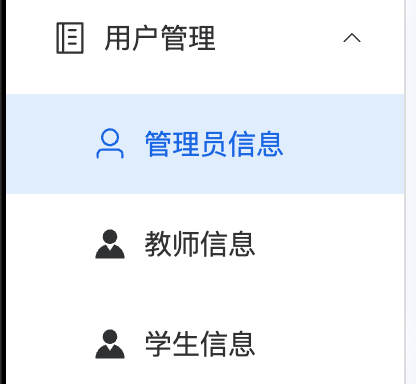
配置路由,加一个student信息
1
| { path: 'student', component: () => import('@/views/manager/Student.vue')},
|
前端
1
2
3
4
5
6
7
8
9
10
11
12
13
14
15
16
17
18
19
20
21
22
23
24
25
26
27
28
29
30
31
32
33
34
35
36
37
38
39
40
41
42
43
44
45
46
47
48
49
50
51
52
53
54
55
56
57
58
59
60
61
62
63
64
65
66
67
68
69
70
71
72
73
74
75
76
77
78
79
80
81
82
83
84
85
86
87
88
89
90
91
92
93
94
95
96
97
98
99
100
101
102
103
104
105
106
107
108
109
110
111
112
113
114
115
116
117
118
119
120
121
122
123
124
125
126
127
128
129
130
131
132
133
134
135
136
137
138
139
140
141
142
143
144
145
146
147
148
149
150
151
152
153
154
155
156
157
158
159
160
161
162
163
164
165
166
167
168
169
170
171
172
173
174
175
176
177
178
179
180
181
182
183
184
185
186
187
188
189
190
191
192
193
194
195
196
197
198
199
200
201
202
203
204
205
206
207
208
209
210
211
212
213
214
215
216
217
218
219
220
221
222
223
224
225
226
227
228
229
230
231
232
233
234
235
236
237
238
239
240
241
242
243
244
245
246
247
248
249
250
251
252
| <template>
<div>
<!--查询重置按钮 -->
<div class="card" style="margin-bottom: 5px;">
<el-input v-model="data.name" style="width: 300px; margin-right: 10px" placeholder="请输入学生姓名"></el-input>
<el-button type="primary" @click="load">查询</el-button>
<el-button type="info" style="margin: 0 10px" @click="reset">重置</el-button>
</div>
<!-- 新增按钮 可以参考Student.vue里面的内容 -->
<div class="card" style="margin-bottom: 5px">
<div style="margin-bottom: 10px">
<!-- 新增学生按钮,点击触发handleAdd方法 -->
<el-button type="primary" @click="handleAdd">新增</el-button>
<!--tableData 所有表格数据在里面,-->
<el-table :data="data.tableData" stripe>
<!--表格列,label是列的标题,prop是列的属性,prop要与后端保持一致,不然接收不到-->
<el-table-column label="用户名" prop="username"></el-table-column>
<el-table-column label="头像" prop="avatar">
<!--头像列,scope是当前行的数据,scope.row.avatar是当前行的头像路径-->
<template v-slot="scope">
<!--scope图片组件,src是图片的路径,style是图片的样式,width是图片的宽度,height是图片的高度,border-radius是图片的圆角-->
<el-image :src="scope.row.avatar" style="width: 40px; height: 40px; border-radius: 50%"></el-image>
</template>
</el-table-column>
<el-table-column label="姓名" prop="name"></el-table-column>
<el-table-column label="性别" prop="sex"></el-table-column>
<el-table-column label="学号" prop="code"></el-table-column>
<el-table-column label="所属学院" prop="college_id"></el-table-column>
<el-table-column label="学分" prop="score"></el-table-column>
<el-table-column label="角色" prop="role"></el-table-column>
<el-table-column label="操作" align="center" width="160">
<template #default="scope">
<!--scope里面有row,row就是当前行的数据,scope.row.id就是当前行的id-->
<el-button type="primary" @click="handleEdit(scope.row)">编辑</el-button>
<el-button type="danger" @click="handleDelete(scope.row.id)">删除</el-button>
</template>
</el-table-column>
</el-table>
</div>
</div>
<!--分页-->
<div class="card">
<!-- prev上一页, pager当前页, next下一页,分页查询的页码, 每页显示的记录数, 总记录数, 分页查询的总记录数-->
<el-pagination background layout="prev, pager, next" v-model:page-size="data.pageSize" v-model:current-page="data.pageNum" :total="data.total" @current-change = "changePage"/>
</div>
<!-- 学生信息弹窗对话框 -->
<el-dialog title="学生信息" width="40%" v-model="data.formVisible" :close-on-click-modal="false" destroy-on-close>
<!--prop v-model 里面要与后端保持一致不然接收不到 -->
<el-form :model="data.form" label-width="100px" style="padding-right: 50px">
<!--图片上传,上传成功后会调用handleImgSuccess方法,上传成功后会返回一个url,我们把这个url赋值给data.form.avatar-->
<el-form-item label="头像" prop="avatar">
<!--el-upload 上传组件,action是上传的地址,list-type是上传的类型,on-success是上传成功后的回调方法-->
<el-upload :action="uploadUrl" list-type="picture" :on-success="handleImgSuccess">
<!--el-button 按钮组件,type是按钮的类型,primary是主按钮-->
<el-button type="primary">上传图片</el-button>
</el-upload>
</el-form-item>
<el-form-item label="账号" prop="username">
<el-input v-model="data.form.username" autocomplete="off" placeholder="请输入账号"/>
</el-form-item>
<el-form-item label="姓名" prop="name">
<el-input v-model="data.form.name" autocomplete="off" placeholder="请输入姓名"/>
</el-form-item>
<el-form-item label="性别" prop="sex">
<el-select v-model="data.form.sex" placeholder="请选择性别" style="width: 100%">
<el-option label="男" value="男"></el-option>
<el-option label="女" value="女"></el-option>
</el-select>
</el-form-item>
<el-form-item label="学号" prop="code">
<el-input v-model="data.form.code" autocomplete="off" placeholder="请输入学号"/>
</el-form-item>
</el-form>
<!-- 弹窗取消,保存 -->
<template #footer>
<span class="dialog-footer">
<el-button @click="data.formVisible = false">取 消</el-button>
<el-button type="primary" @click="save">保 存</el-button>
</span>
</template>
</el-dialog>
</div>
</template>
<script setup>
//导包
import {reactive} from "vue";
import request from "@/utils/request";
import {ElMessage, ElMessageBox} from "element-plus";
//定义上传接口地址,这里是后端提供的接口地址
//VITE_BASE_URL是在.env.development文件中定义的,这里是开发环境的地址
// /files/upload是后端提供的接口地址
const uploadUrl = import.meta.env.VITE_BASE_URL + '/files/upload';
const data = reactive({
// 学生信息弹窗对话框
formVisible: false,
// 学生信息表单数据
form: {
},
// 学生信息表格数据的数组,初始为空数组
tableData: [],
// 分页查询的页码
pageNum: 1,
// 分页查询的每页显示的记录数
pageSize: 5,
// 分页查询的总记录数,初始为0
total: 0,
// 学生姓名
name: null,
});
const load = () => {
// 调用后端接口查询学生信息
// 这里可以使用axios或者其他请求库发送请求
// 例如:axios.get('/api/student/selectPage', { params: { pageNum: data.pageNum, pageSize: data.pageSize } })
request.get('/student/selectPage',{//请求路径
params:{//查询条件
pageNum: data.pageNum,//页码
pageSize: data.pageSize, //每页显示的记录数
name: data.name,//学生姓名
}
}
).then(res => {
if (res.code === '200') {
// 将查询到的学生信息数据赋值给tableData
// res.data?.list 是一个数组,包含了查询到的学生信息数据
// ?是一个可选链操作符,用于安全地访问对象的属性,如果对象为null或undefined,则不会抛出错误,而是返回undefined
data.tableData = res.data?.list
// 将查询到的总记录数赋值给total
data.total = res.data?.total
}else {
// 查询失败,提示用户
ElMessage.error(res.msg)
}
})
}
// 分页查询,点击页码触发,改变页码,触发load()
const changePage = (pageNum) => {
data.pageNum = pageNum //页码
load()
}
// 新增学生按钮点击事件
const handleAdd = () => {
// 清空学生信息表单数据
data.form = {
}
// 打开学生信息弹窗对话框
data.formVisible = true
}
// 编辑学生按钮点击事件
const handleEdit = (row) => {
// 将选中的学生信息数据赋值给学生信息表单数据
// 这里可以使用JSON.parse(JSON.stringify(row))来深拷贝row对象,避免修改row对象时影响到tableData
// 因为row是一个对象,而对象是引用类型,直接赋值给data.form会导致修改row时也会修改data.form,所以需要深拷贝
// 将row对象转换为字符串,再转换为对象,这样就会创建一个新的对象,不会影响到原来的row对象
data.form = JSON.parse(JSON.stringify(row))
// 打开学生信息弹窗对话框
data.formVisible = true
}
// 删除学生按钮点击事件
const handleDelete = (id) => {
// 弹出确认框,提示用户是否确定删除
// 如果用户点击确定,就调用后端接口删除学生信息
// 如果用户点击取消,就不做任何操作
ElMessageBox.confirm('删除后数据无法恢复,您确定删除吗?', '删除确认', { type: 'warning' }).then(res => {
// 调用后端接口删除学生信息
// 这里可以使用axios或者其他请求库发送请求
// 例如:axios.delete('/api/student/deleteById/' + id)
request.delete('/student/deleteById/' + id).then(res => {
// 提示用户删除成功或者失败
if (res.code === '200') {
ElMessage.success('操作成功')
load()
} else {
ElMessage.error(res.msg)
}
})
}).catch(err => {})
}
// 新增保存按钮点击事件
const add = () => {
// 调用后端接口保存学生信息
// 这里可以使用axios或者其他请求库发送请求
// 例如:axios.post('/api/student/add', data.form)
request.post('/student/add', data.form).then(res => {
if (res.code === '200') {
// 保存成功,提示用户
ElMessage.success('操作成功')
// 重新加载学生信息
load()
// 关闭学生信息弹窗对话框
data.formVisible = false
}else {
// 保存失败,提示用户
ElMessage.error(res.msg)
}
})
}
// 更新保存学生信息按钮点击事件
const update = () => {
// 调用后端接口更新学生信息
// 这里可以使用axios或者其他请求库发送请求
// 例如:axios.put('/api/student/update', data.form)
request.put('/student/update', data.form).then(res => {
if (res.code === '200') {
// 更新成功,提示用户
ElMessage.success('操作成功') //提示用户
// 重新加载学生信息
load()
}else {
// 更新失败,提示用户
ElMessage.error(res.msg)
}
})
}
// 保存学生信息按钮点击事件
const save = () => {
// 判断学生信息表单数据是否有id属性
// 如果有id属性,说明是编辑学生信息,调用更新学生信息接口
// 如果没有id属性,说明是新增学生信息,调用新增学生信息接口
// 三元运算符,如果data.form.id有值,就调用update(),否则调用add()
data.form.id ? update() : add()
}
const reset = () => {
// 重置查询条件
data.name = null
// 重新加载学生信息
load()
}
//上传成功后调用的方法,把上传成功后的图片地址赋值给data.form.avatar
//res.data.url 是上传成功后的图片地址
const handleImgSuccess = (res) => {
// res.data 是上传成功后的图片
// 我们把这个地址赋值给data.form.avatar
data.form.avatar = res.data
//相当于和avatar绑定了
}
load()
</script>
|
后端
Controller—StudentController
1
2
3
4
5
6
7
8
9
10
11
12
13
14
15
16
17
18
19
20
21
22
23
24
25
26
27
28
29
30
31
32
33
34
35
36
37
38
39
40
41
42
43
44
45
46
47
48
49
|
@RestController
@RequestMapping("/student")
public class StudentController {
@Resource
private StudentService studentService;
@PostMapping("/add")
public Result add(@RequestBody Student student){
studentService.add(student);
return Result.success();
}
@PutMapping("/update")
public Result update(@RequestBody Student student){
studentService.updateById(student);
return Result.success();
}
@DeleteMapping("/deleteById/{id}")
public Result deleteById(@PathVariable Integer id) {
studentService.deleteById(id);
return Result.success();
}
@GetMapping("selectPage")
public Result selectPage(Student student,
@RequestParam(defaultValue = "1") Integer pageNum,
@RequestParam(defaultValue = "5") Integer pageSize){
PageInfo<Student> pageInfo = studentService.selectPage(student,pageNum,pageSize);
return Result.success(pageInfo);
}
}
|
Service—StudentService 核心逻辑
1
2
3
4
5
6
7
8
9
10
11
12
13
14
15
16
17
18
19
20
21
22
23
24
25
26
27
28
29
30
31
32
33
34
35
36
37
38
39
40
41
42
43
44
45
46
47
48
49
50
51
52
53
54
55
56
|
@Service
public class StudentService {
@Resource
private StudentMapper studentMapper;
public void add(Student student) {
Student dbStudent = studentMapper.selectByUsername(student.getUsername());
if (ObjectUtil.isNotEmpty(dbStudent)) {
throw new CustomException("用户名已存在");
}
if(ObjectUtil.isEmpty(student.getPassword())){
student.setPassword("123456");
}
student.setRole("STUDENT");
student.setScore(0);
studentMapper.insert(student);
}
public PageInfo<Student> selectPage(Student student,Integer pageNum, Integer pageSize) {
List<Student> list;
PageHelper.startPage(pageNum,pageSize);
if(ObjectUtil.isNotEmpty(student.getName())){
list = studentMapper.selectByName(student.getName());
}else{
list = studentMapper.selectAll();
}
return PageInfo.of(list);
}
public void updateById(Student student) {
studentMapper.updateById(student);
}
public void deleteById(Integer id) {
studentMapper.deleteById(id);
}
}
|
Mapper—StudentMapper
1
2
3
4
5
6
7
8
9
10
11
12
13
14
15
16
17
18
19
20
21
22
| @Mapper
public interface StudentMapper {
void insert(Student student);
@Select("select * from student where username = #{username}")
Student selectByUsername(String username);
@Select("select * from student")
List<Student> selectAll();
@Select("select * from student where name like concat('%',#{name},'%')")
List<Student> selectByName(String name);
void updateById(Student student);
@Delete("delete from student where id = #{id}")
void deleteById(Integer id);
}
|
StudentMapper.xml
1
2
3
4
5
6
7
8
9
10
11
12
13
14
15
16
17
18
| <?xml version="1.0" encoding="UTF-8"?>
<!DOCTYPE mapper
PUBLIC "-//mybatis.org//DTD Mapper 3.0//EN"
"http://mybatis.org/dtd/mybatis-3-mapper.dtd">
<mapper namespace="com.example.mapper.StudentMapper">
<insert id="insert" parameterType="com.example.entity.Student" useGeneratedKeys="true">
insert into student (username, password, name, sex, role, avatar, college_id, code, score)
values (#{username}, #{password}, #{name}, #{sex}, #{role}, #{avatar}, #{collegeId}, #{code}, #{score})
</insert>
<update id="updateById" parameterType="com.example.entity.Student">
update student
set username = #{username}, password = #{password}, name = #{name},
sex = #{sex}, college_id = #{collegeId}, role = #{role}, avatar = #{avatar},
score = #{score}, code = #{code}
where id = #{id}
</update>
</mapper>
|