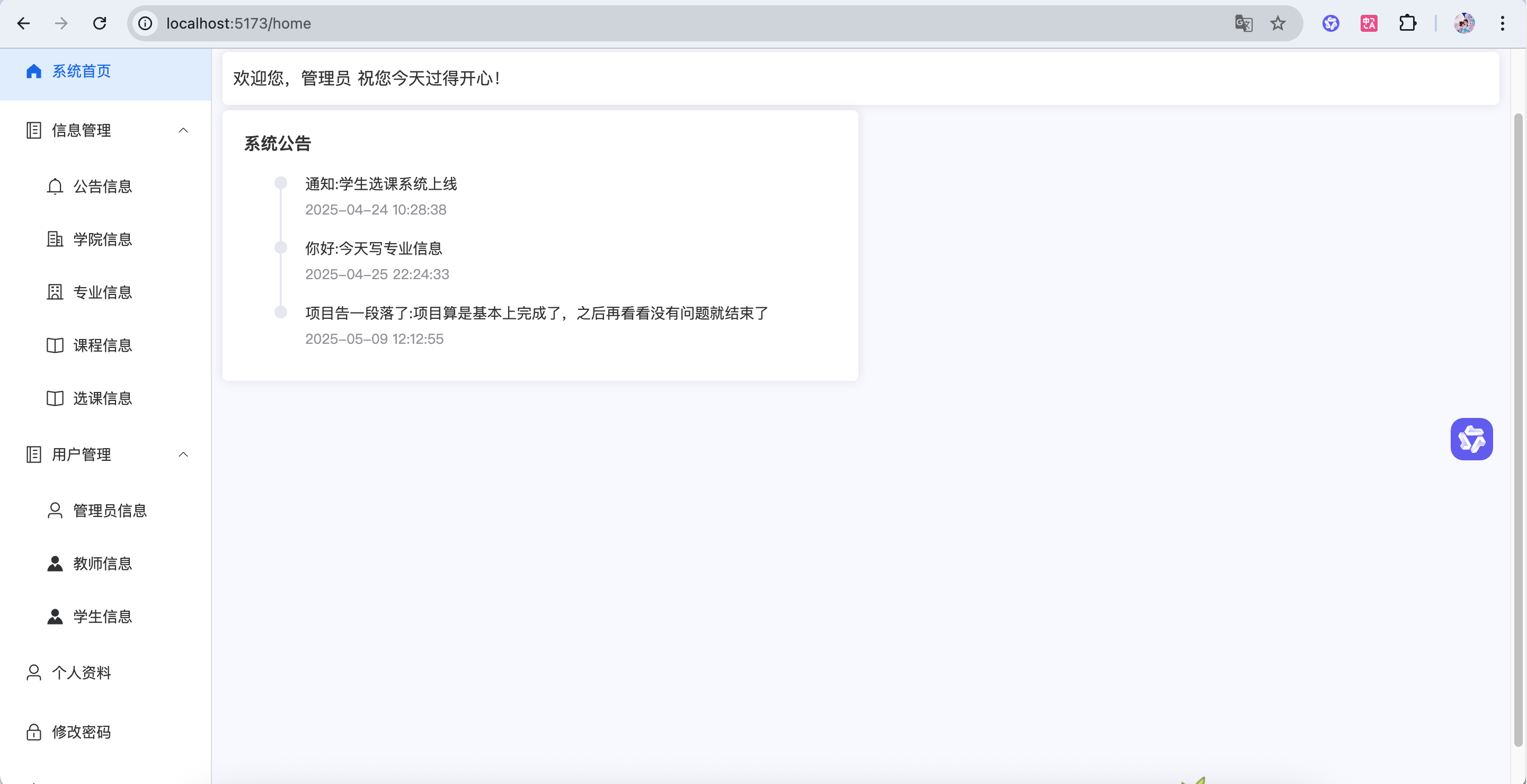
逻辑 核心功能: 管理员可以查看所有专业列表(带分页)
数据关系: 专业和学院是父子关系(一个学院有多个专业)
操作流程: 点”新增” → 填专业名称 + 选择所属学院 → 保存
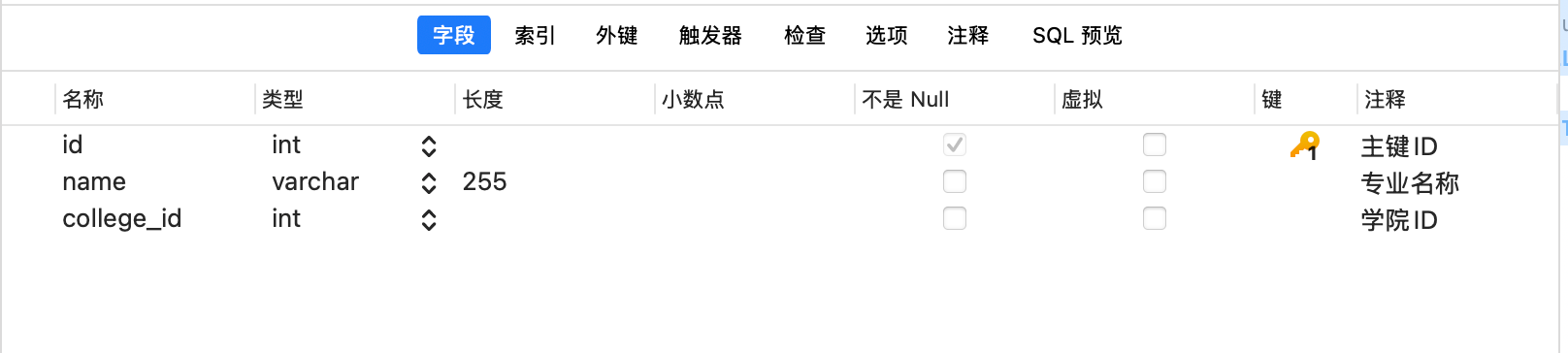
创建数据库 1 2 3 4 5 6 CREATE TABLE `speciality` ( `id` int NOT NULL AUTO_INCREMENT COMMENT '主键ID' , `name` varchar (255 ) COLLATE utf8mb4_unicode_ci DEFAULT NULL COMMENT '专业名称' , `college_id` int DEFAULT NULL COMMENT '学院ID' , PRIMARY KEY (`id`) ) ENGINE= InnoDB DEFAULT CHARSET= utf8mb4 COLLATE = utf8mb4_unicode_ci COMMENT= '专业信息' ;
entity—Speciality.java 1 2 3 4 5 6 7 8 9 10 11 12 13 14 15 16 17 18 19 20 21 22 23 24 25 26 27 28 29 30 31 32 33 34 35 36 37 38 39 40 41 package com.example.entity;public class Speciality { private Integer id; private String name; private Integer collegeId; private String collegeName; public Integer getId () { return id; } public void setId (Integer id) { this .id = id; } public String getName () { return name; } public void setName (String name) { this .name = name; } public Integer getCollegeId () { return collegeId; } public void setCollegeId (Integer collegeId) { this .collegeId = collegeId; } public String getCollegeName () { return collegeName; } public void setCollegeName (String collegeName) { this .collegeName = collegeName; } }
前端 Manager.vue 1 2 3 4 <el-menu-item index ="/speciality" v-if ="data.user.role === 'ADMIN'" > <el-icon > <School /> </el-icon > <span > 专业信息</span > </el-menu-item >
index.js 配置路由
1 { path : 'speciality' , component : () => import ('@/views/manager/Speciality.vue' )},
Speciality.vue 1 2 3 4 5 6 7 8 9 10 11 12 13 14 15 16 17 18 19 20 21 22 23 24 25 26 27 28 29 30 31 32 33 34 35 36 37 38 39 40 41 42 43 44 45 46 47 48 49 50 51 52 53 54 55 56 57 58 59 60 61 62 63 64 65 66 67 68 69 70 71 72 73 74 75 76 77 78 79 80 81 82 83 84 85 86 87 88 89 90 91 92 93 94 95 96 97 98 99 100 101 102 103 104 105 106 107 108 109 110 111 112 113 114 115 116 117 118 119 120 121 122 123 124 125 126 127 128 129 130 131 132 133 134 135 136 137 138 139 140 141 142 143 144 145 146 147 148 149 150 151 152 153 154 155 156 157 158 159 160 161 162 163 164 165 166 167 168 169 170 171 172 173 <template> <div> <div class="card" style="margin-bottom: 5px;"> <el-input v-model="data.name" style="width: 300px; margin-right: 10px" placeholder="请输入专业名称查询"></el-input> <el-button type="primary" @click="load">查询</el-button> <el-button type="info" style="margin: 0 10px" @click="reset">重置</el-button> </div> <div class="card" style="margin-bottom: 5px"> <div style="margin-bottom: 10px"> <el-button type="primary" @click="handleAdd">新增</el-button> </div> <el-table :data="data.tableData" stripe> <el-table-column label="专业名称" prop="name"></el-table-column> <el-table-column label="所属学院" prop="collegeName"></el-table-column> <el-table-column label="操作" align="center" width="160"> <template #default="scope"> <el-button type="primary" @click="handleEdit(scope.row)">编辑</el-button> <el-button type="danger" @click="handleDelete(scope.row.id)">删除</el-button> </template> </el-table-column> </el-table> </div> <div class="card"> <el-pagination background layout="prev, pager, next" v-model:page-size="data.pageSize" v-model:current-page="data.pageNum" :total="data.total"/> </div> <el-dialog title="专业信息" width="40%" v-model="data.formVisible" :close-on-click-modal="false" destroy-on-close> <el-form :model="data.form" label-width="100px" style="padding-right: 50px"> <el-form-item label="专业名称" prop="name"> <el-input v-model="data.form.name" autocomplete="off" /> </el-form-item> <el-form-item label="所属学院" prop="collegeId"> <!-- 专业信息是关联学院的,所以在新增(编辑)专业信息的时候,需要选择对应的学院,绑定起来。--> <el-select v-model="data.form.collegeId" placeholder="请选择学院" style="width: 100%"> <el-option v-for="item in data.collegeDate" :key="item.id" :label="item.name" :value="item.id"> </el-option> <!-- v-model="data.form.collegeId" 绑定专业信息的学院id--> <!-- placeholder="请选择学院" 提示用户选择学院--> <!-- style="width: 100%" 设置下拉框的宽度为100%--> <!-- v-for="item in data.collegeDate" 遍历学院信息--> <!-- :key="item.id" 设置每个学院的key为id--> <!-- :label="item.name" 设置每个学院的label为name--> <!-- :value="item.id" 设置每个学院的value为id--> </el-select> </el-form-item> </el-form> <template #footer> <span class="dialog-footer"> <el-button @click="data.formVisible = false">取 消</el-button> <el-button type="primary" @click="save">保 存</el-button> </span> </template> </el-dialog> </div> </template> <script setup> import request from "@/utils/request"; import {reactive} from "vue"; import {ElMessageBox, ElMessage} from "element-plus"; const data = reactive({ pageNum: 1, pageSize: 10, total: 0, formVisible: false, form: {}, tableData: [], name: null, collegeDate: []// 用于存储学院信息 }) // 分页查询 const load = () => { request.get('/speciality/selectPage', { params: { pageNum: data.pageNum, pageSize: data.pageSize, name: data.name } }).then(res => { data.tableData = res.data?.list data.total = res.data?.total }) } // 新增 const handleAdd = () => { data.form = {} data.formVisible = true } // 编辑 const handleEdit = (row) => { data.form = JSON.parse(JSON.stringify(row)) data.formVisible = true } // 新增保存 const add = () => { request.post('/speciality/add', data.form).then(res => { if (res.code === '200') { load() ElMessage.success('操作成功') data.formVisible = false } else { ElMessage.error(res.msg) } }) } // 编辑保存 const update = () => { request.put('/speciality/update', data.form).then(res => { if (res.code === '200') { load() ElMessage.success('操作成功') data.formVisible = false } else { ElMessage.error(res.msg) } }) } // 弹窗保存 const save = () => { // data.form有id就是更新,没有就是新增 data.form.id ? update() : add() } // 删除 const handleDelete = (id) => { ElMessageBox.confirm('删除后数据无法恢复,您确定删除吗?', '删除确认', { type: 'warning' }).then(res => { request.delete('/speciality/deleteById/' + id).then(res => { if (res.code === '200') { load() ElMessage.success('操作成功') } else { ElMessage.error(res.msg) } }) }).catch(err => {}) } // 重置 const reset = () => { data.name = null load() } const loadCollege= () => {//查询所有学院信息 request.get('/college/selectAll').then(res => {//调用后端接口查询所有学院信息 if (res.code === '200') {//如果查询成功,将查询到的学院信息赋值给data.collegeDate data.collegeDate = res.data }else {//如果查询失败,提示用户 ElMessage.error(res.msg) } }) } load() loadCollege() </script>
Controller—SpecialityController.java 1 2 3 4 5 6 7 8 9 10 11 12 13 14 15 16 17 18 19 20 21 22 23 24 25 26 27 28 29 30 31 32 33 34 35 36 37 38 39 40 41 42 43 44 45 46 47 48 49 50 51 52 53 54 55 56 57 58 59 60 61 @RestController @RequestMapping("/speciality") public class SpecialityController { @Resource private SpecialityService specialityService; @PostMapping("/add") public Result add (@RequestBody Speciality speciality) { specialityService.add(speciality); return Result.success(); } @PutMapping("/update") public Result update (@RequestBody Speciality speciality) { specialityService.updateById(speciality); return Result.success(); } @DeleteMapping("/deleteById/{id}") public Result deleteById (@PathVariable Integer id) { specialityService.deleteById(id); return Result.success(); } @GetMapping("selectPage") public Result selectPage (Speciality speciality, @RequestParam(defaultValue = "1") Integer pageNum, @RequestParam(defaultValue = "5") Integer pageSize) { PageInfo<Speciality> pageInfo = specialityService.selectPage(speciality,pageNum,pageSize); return Result.success(pageInfo); } @GetMapping("/selectAll") public Result selectAll () { List<Speciality> list = specialityService.selectAll(); return Result.success(list); } }
SpecialityService.java 1 2 3 4 5 6 7 8 9 10 11 12 13 14 15 16 17 18 19 20 21 22 23 24 25 26 27 28 29 30 31 32 33 34 35 36 37 38 39 40 41 42 43 44 45 46 47 48 49 50 @Service public class SpecialityService { @Resource private SpecialityMapper specialityMapper; public void add (Speciality speciality) { specialityMapper.insert(speciality); } public PageInfo<Speciality> selectPage (Speciality speciality,Integer pageNum, Integer pageSize) { List<Speciality> list; PageHelper.startPage(pageNum,pageSize); if (ObjectUtil.isNotEmpty(speciality.getName())){ list = specialityMapper.selectByName(speciality.getName()); }else { list = specialityMapper.selectAll(); } return PageInfo.of(list); } public void updateById (Speciality speciality) { specialityMapper.updateById(speciality); } public void deleteById (Integer id) { specialityMapper.deleteById(id); } public List<Speciality> selectAll () { return specialityMapper.selectAll(); } }
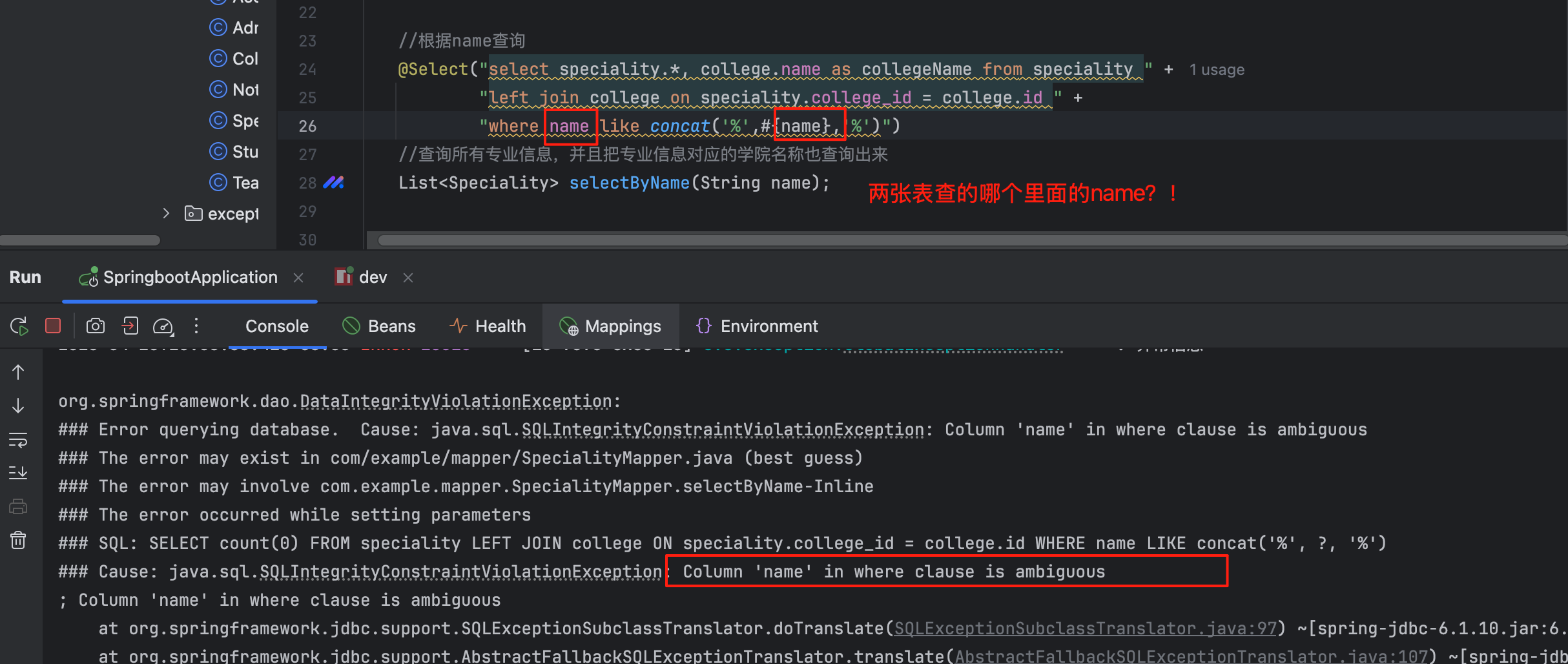
Mapper SpecialityMapper.java 1 2 3 4 5 6 7 8 9 10 11 12 13 14 15 16 17 18 19 20 21 22 23 24 25 Mapper public interface SpecialityMapper { void insert (Speciality speciality) ; @Select("select speciality.*, college.name as collegeName from speciality left join college on speciality.college_id = college.id") List<Speciality> selectAll () ; @Select("select speciality.*, college.name as collegeName from speciality " + "left join college on speciality.college_id = college.id " + "where speciality.name like concat('%',#{name},'%')") List<Speciality> selectByName (String name) ; void updateById (Speciality speciality) ; @Delete("delete from speciality where id = #{id}") void deleteById (Integer id) ; }
SpecialityMapper.xml 1 2 3 4 5 6 7 8 9 10 11 12 13 14 15 16 17 <?xml version="1.0" encoding="UTF-8" ?> <!DOCTYPE mapper PUBLIC "-//mybatis.org//DTD Mapper 3.0//EN" "http://mybatis.org/dtd/mybatis-3-mapper.dtd" > <mapper namespace ="com.example.mapper.SpecialityMapper" > <insert id ="insert" parameterType ="com.example.entity.Speciality" useGeneratedKeys ="true" > insert into speciality (name, college_id) values (#{name}, #{collegeId}) </insert > <update id ="updateById" parameterType ="com.example.entity.Speciality" > update speciality set name = #{name}, college_id = #{collegeId} where id = #{id} -- 这里的id是实体类中的属性名,不是数据库中的字段名 </update > </mapper >
如果后面遇到这种什么字段缺少getter/setter方法,除了去这个实体类里面排查一下之外,记住还有一个地方可能出现问题:xxxMapper.xml
当这个字段是有下划线的时候,要注意:获取它的值的变量要是驼峰。
vue :https://element-plus.org/zh-CN/
当你在页面操作的时候,没有反应,怎么办??怎么去排查??
按F12打开前台页面控制台,看一下前端有没有报错?
看一下网络请求,接口有没有调用或者参数有没有传对,如果不对,那在前端检查一下参数的传递;如果对了,那就检查一下后端有没有报错,或者有没有其他问题
检查后端控制台信息,如果报错了,找到报错的地方,断点看一下;如果没有报错,必须要debug跟一下了,看看每一步的数据对不对。
有个关联查询很重要!!!
ambiguous:模棱两可的